How I Built a $0/Month Second Brain That Outperforms Any $200+/Year Productivity Stack (And Got Addicted to Daily Wins)

It's 9pm on a Thursday and I'm staring at my phone, watching a Shortcut I just built process my day's random thoughts into a beautifully structured note in under three seconds. The same task that used to require opening Notion, finding the right database, filling in properties, and linking to related notes.
What started out with me tinkering with iOS shortcuts ended up replicating various productivity tools I’ve tried over the years but tailored to me and with some free tools and a bit of AI magic. Notion. Roam Research. Readwise. All rendered... optional.
This isn't another "I tried every productivity app" post. This is about stumbling into something that feels genuinely different - a shift from renting productivity features to owning an actual system. One that gets smarter as I use it, lives entirely under my control, and cost me exactly nothing beyond my existing Claude subscription.
The journey started innocently enough. Down an experimental rabbit hole (so far, so standard for this blog) but ended up making me think we’re closer than I thought to up-ending big chunks of the SaaS market.
Like many of you I’m sure, I’ve tried OneNote, Evernote, Notion, etc to find a productivity system that works. I have always been frustrated by how many apps or steps sat between my thoughts and my knowledge base. Capture in one place. Process in another. Link in a third. Review in a fourth. Each transition a tax on my thinking.
What I built instead might be the most valuable couple of hours of tinkering I've done all year. And one that, if you read to the end, has surprising mental health benefits.
With that, let's dive in.
The Accidental Architecture
I didn't set out to build a second brain. I set out to solve a simpler problem: I wanted to capture thoughts the moment they hit me, without friction, and have them automatically processed into something useful. The eagle-eyed among you will recall I referenced that I'd built a second brain (credit to Tiago Forte who popularised the term) in my blog "You're Not Too Late to The AI Party" using Google Drive.
The stack I landed on is simple but has evolved slightly since:

iPhone Shortcuts for capture (triggered by tapping an icon – the Siri upgrade will be coming soon!)
Claude with Model Context Protocol (MCP) for processing (Filesystem MCP)
iCloud Drive for storage (just markdown files in folders)
Here's how it works in practice: I tap my phone and I ramble for 30 seconds about whatever's on my mind (or type or copy a link from a website). The Shortcut transcribes it, updates a markdown file (just a plain text file in a format LLMs like). At the end of the day I prompt Claude by saying ‘Let’s perform the daily review’, and within a minute or so, I have a properly formatted summary of today’s ideas, new books or articles to read, wins to celebrate or to-dos to follow up on (personal not confidential professional content for security reasons). This is well structured:
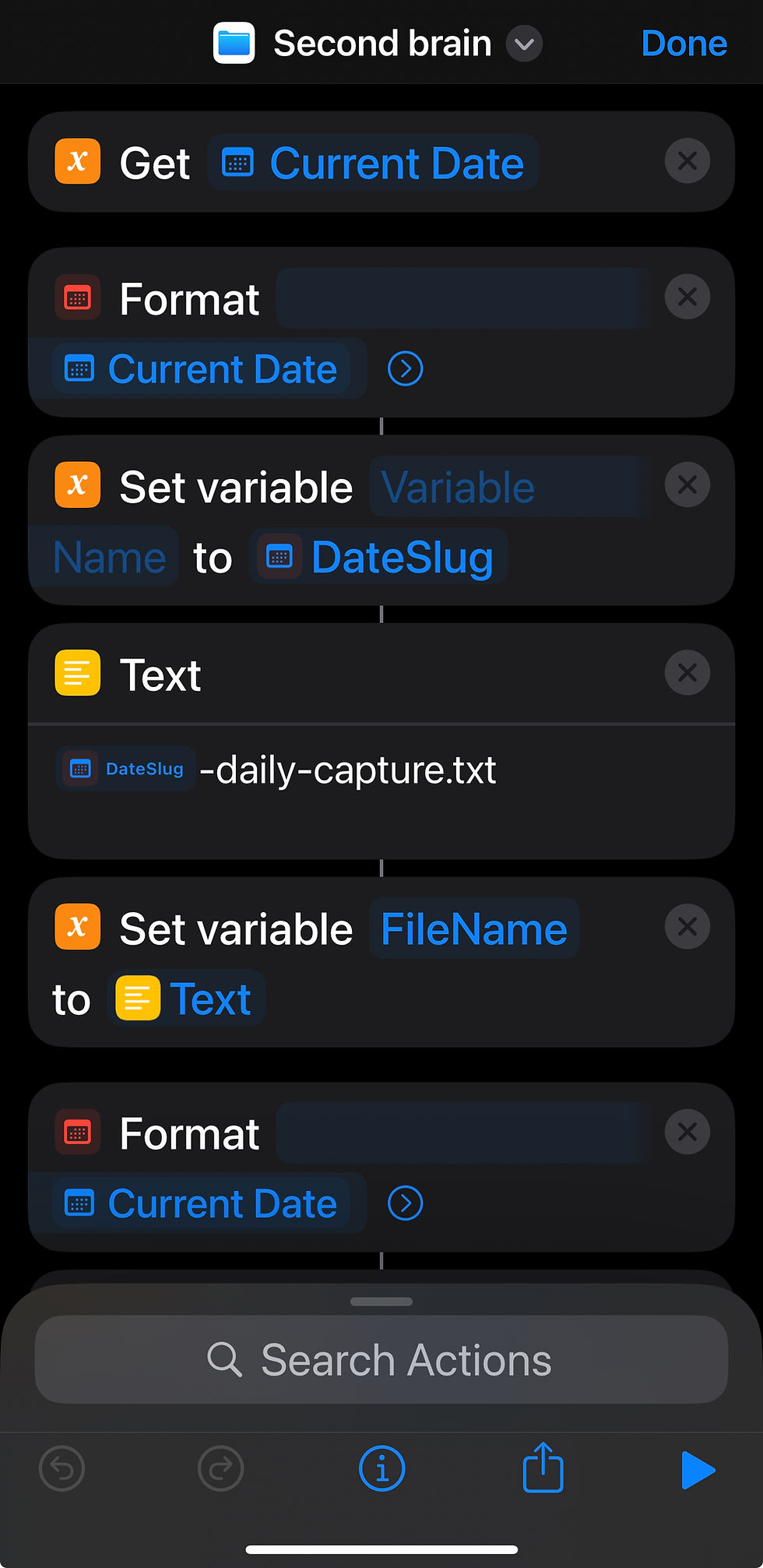
Extracted action items
Links to related notes
Appropriate tags and metadata
All in structured files following a template (which of course I had AI create)
All saved as markdown files in my iCloud, accessible from any device, portable, and completely under my control.
The first time this worked I was pretty stunned. Not because it was perfect - it wasn't. But because I'd just compressed a five-app workflow - or post it notes floating round my home - into a three-second interaction.
Importantly, when we’re all as busy as we are, I’ve finally found a zero-friction way of getting recurring thoughts out of my head allowing me to focus on being productive during the day.
What This Means
The Integration Tax Is Dead
Here's something I didn't fully appreciate until I built this: traditional productivity apps charge you twice. Once for the features, and again for the integrations between features.
Want to capture quickly? That's one app. Process those captures? Different app. Link them to your knowledge base? Another app. Review them regularly? Yet another subscription.
The genius of using MCP-enabled AI is that the filesystem itself becomes the integration layer. Claude doesn't need a paid API to talk to my notes - they're just files it can read and write. The Shortcut doesn't need Zapier to connect capture to processing - it just passes text to Claude and saves the result.
I'm no longer paying the integration tax. My notes are just... notes. Files on a drive that any tool can access.
The Intelligence Layer Sits Where It Should
Tools like Notion and Roam charge premium prices partially because they're trying to be smart. They have linking algorithms, recommendation engines, and features that attempt to surface connections. But they're always playing catch-up to your actual thinking, and their intelligence is locked inside their walled garden.
With AI doing the heavy lifting, the intelligence lives in the prompt - which I control, version, and refine. Claude understands context, can spot connections between ideas, and gets better as my prompt library evolves and the context in the notes folder builds. Meanwhile, my notes themselves remain simple markdown files that will outlive any specific AI provider.
The value shifted from the container (Notion et al) to the intelligence layer (Claude + my prompts + my files and templates). And crucially, I own the content here, which leads me on to my next point.
Data Sovereignty Became Default, Not a Feature
This wasn't even on my radar when I started, but it might be the most important benefit: my second brain is genuinely mine.
Every note is a portable markdown file. If Claude disappeared tomorrow, I'd still have my notes. If iCloud became untenable, I could move to Dropbox, or a local folder, or anywhere else.
My system gives me what Nassim Taleb calls antifragility - the optionality or freedom to change components without losing the whole. That's antifragility applied to knowledge management.
The Unexpected Discovery: The Psychology of Daily Wins
Here's the part that for me was more interesting than the productivity gains. (If your interests are purely AI / tech you can stop reading now!).
About two weeks into using this system, I noticed something: I'd become slightly addicted to using it. Not in a doom-scrolling way, but in a surprisingly healthy way. I was actively looking for opportunities to capture thoughts, process ideas, and review my day's notes.
The psychology behind this is fascinating and wasn't something I designed for - it emerged naturally from how the system works.
The Power of Immediate Feedback
Every time I use my capture Shortcut, I get near-instant gratification. Within seconds, my scattered thoughts get captured and that alone provides immediate relief. That speed creates a tight feedback loop that behavioural psychology suggests is crucial for habit formation. BF Skinner's research on "operant conditioning" showed that immediate reinforcement is far more powerful than delayed reinforcement. My system collapses the timeline and eliminated the frictions normally involved.
Compound Progress Made Visible
I worked with a coach when I moved firms last year and got introduced to journalling small daily victories – “wins” – which had a surprisingly positive effect on my mindset. The challenge with capturing wins at the end of the day is you can end up scratching around trying to remember those victories, big and small, you celebrated through the day.
As a result of this insight, I created a folder in my system called "Daily Wins”. During the day, I spot where I’ve made progress – getting chores done, beating procrastination, eating well, making time for the right things, whatever it is. Then in the evening, my daily review process adds those to a growing markdown file that tracks these wins over time. When I ask Claude to “Help me celebrate my wins for the day” I get a great series of reflections that beats me trying to capture them from memory.
My AI-powered daily wins practice is visible, concrete and reviewable. Every weekend, my review prompt includes a summary of the week's wins. I did that just before finalising this blog draft and seeing "You celebrated 38 wins this week" alongside actual examples creates a psychological reward that's surprisingly potent. It's progress gamification, but for meaningful life stuff, not arbitrary points.
The Dopamine Architecture
I didn't design this consciously, but my system has accidentally created what I'd call a "healthy dopamine architecture."
Every successful capture → updating the note provides a small dopamine hit. Not the slot-machine randomness of social media, but the craftsperson's satisfaction of seeing good work done quickly.
The daily wins review provides a larger, more reflective dopamine release - the kind that comes from recognising genuine progress toward meaningful goals.
The weekly summary provides the biggest reward: pattern recognition across multiple wins, connections between ideas, and evidence of agency.
Why This Actually Works
The real magic isn't in any single element - it's in how they combine:
Low friction capture removes barriers to starting
Immediate AI processing provides fast feedback
Visible progress tracking creates awareness of growth
Daily wins practice builds positive momentum
Structured review reinforces learning and adaptation
Traditional productivity systems fail because they add friction at every step. My AI-powered second brain removes friction while adding reinforcement. It's not about being more productive in some abstract sense - it's about making the process of thinking and capturing thoughts genuinely enjoyable.
The Bottom Line
This week’s blog has been a bit different. It was about a few things (breaking all rules about trying to land a single message).
Firstly it’s about AI’s impact on SaaS. I had assumed this was coming about because of the cost of coding / software trending to zero. Actually, some of the bigger disruptions may simply be the novel architectures that become available that help us rethink the value we take from software. Sovereignty over our own data is a very interesting dimension.
Secondly it’s about building software tailored to our needs. This isn’t because AI is magic - it's because I finally built a system around how I actually think rather than conforming to how apps want me to think. Important here is the complete lack of friction too.
And finally, perhaps the biggest point of this post is psychological. My second brain isn’t about productivity per se. As a result of the setup, I'm more engaged with my own thinking. The daily wins practice I had implemented before rewires how I view progress. Now, I have better evidence - concrete, reviewed, celebrated evidence - that I'm moving forward. This doesn’t just make you feel good at the end of the day or week. It means I go hunting for progress during the day. That task you’ve been procrastinating over? It’s now a candidate for a win!
Your productivity stack doesn't need to be rented from multiple vendors at hundreds of dollars a year. It can be owned, controlled, and refined to match your actual cognitive patterns.
The tools are already here. MCP-enabled AI. Simple automation. Portable file formats. We can combine these pieces ourselves.
I am happy to share the shortcut or prompt structure or approach I used to develop my second brain with any reader. But first, perhaps reflect, what part of your life would you automate or eliminate friction from first? Please do let me know.
What I’ve learned with this second brain experiment is further cause for optimism. Maybe the positive impact of AI won’t be the big thing that makes you money or cures cancer. Maybe the positive impact will be 100 subtle ways in which it will positively impact your daily life and elevate our collective wellbeing.
Just maybe.
Until next time, you'll find me on the tube, capturing random thoughts into my second brain, flexibly managing my to-do list and putting a smile on my face celebrating yesterday's wins...
Resources & Further Reading
Primary Sources
Model Context Protocol Documentation: https://docs.anthropic.com/en/docs/build-with-claude/mcp
iPhone Shortcuts Guide: https://support.apple.com/guide/shortcuts/welcome/ios
Teresa Amabile: "The Progress Principle" - Harvard Business Review
BF Skinner's Operant Conditioning research
Bluma Zeigarnik's research on task completion and memory
Philosophical Grounding:
"How to Take Smart Notes" by Sönke Ahrens
"The Zettelkasten Method" resources
Nassim Taleb's "Antifragile" (on optionality and system resilience)
Community:
r/ObsidianMD for markdown-based knowledge management
r/Shortcuts for iOS automation ideas
Building a Second Brain community (various platforms)


Fascinating! Please share with me how to build this on my phone (If possible with ChatGPT instead of Claude, otherwise I’ll adapt to Claude)
Hey, Very interesting workflow you have built for yourself. I was tinkering with a similar second brain for myself, but super curious about learning from your approach. Could you share more details about your system? Like shortcut, prompts and integration with iCloud file system?